Monday, April 24, 2017

C++ PROGRAM

Salam & welcome back guys!
How are you guys doing? we hope that you guys are doing fineπŸ˜ƒ

In this entry, we would like to share on the C++ program.  According to wikipedia, C++ is a general purpose programming language. Basically there are 6 basic elements in this program:


  1.  Simple C++ program
  • The simple C++ program is can be done at πŸ‘‰ click here and then choose C++ in the language search
  • The format and example is:
1 // Writing my age 
πŸ‘‰ 1st line is called comment line that describe the purpose of the program
πŸ‘‰ Must begin with //

3 #include <iostream>
πŸ‘‰ Is the processor directive
πŸ‘‰ Must begin with #
πŸ‘‰ <iostream> is the library of function, symbols and operators

4 using namespace std; 
πŸ‘‰ To give instruction to the compiler to use function in standard library.
6 int main() 
πŸ‘‰ The main function of the program

7 { 
πŸ‘‰ Code starts { 

8 int age; // input - age 
10 // Get data on age 

11 cout << "Enter your age => ";
πŸ‘‰ An interactive message which the program asking for data from the user as input data is called a prompt

12 cin >> age;
πŸ‘‰ The variable name has to be defined earlier

13 
14 //Display message 

15 cout << "I am " << age << " years old" << endl; 
πŸ‘‰ endl is used to terminate a line of output and starts a new one

16 return 0; 
πŸ‘‰ indicates that the program has ran normally

17 } 
πŸ‘‰ ends of the code

  • the coding is as shown below:


  • The input will be:

Enter your age =>  19
I am 19 years old
  

      2. Data Types
  • Numbers
- Floating point numbers
   πŸ‘‰ Numbers with fractional part or decimal place
- Integers
   πŸ‘‰ Exact numbers without decimal place

  • Characters
- Store single characters 
- Written as char
- The characters is enclosed in single quotes

  • Strings
- Double quotes is used to enclose a string’s value 

      3. Arithmetic expression
  • Multiple operators
- Parentheses of complex sub-expression. eg:
p / –q + ( r – s + t ) * n => ( p / (-q) ) + ( ( r – s + t ) * n )
 
  • Operators / and % 
- Calculate the integer quotient (/) & remainder (%)

  • Rounding
- If you want to round a positive value of the float to the nearest integer, add 0.5 before explicitly converting to an int to avoid loss of the value’s fractional part

      4. Additional Operators
- Besides, + - * / , C++ program also can provides predefined units called functions for operators 
- The list of names and descriptions of some of the most commonly used functions are as shown below:


Well, that's all  what we had learnt in the past class. Till then, thank you guys for constantly reading our blog!πŸ’‹πŸ˜˜


Friday, April 7, 2017

PYTHON & JUPYTER

Assalammulaikum w.b.t everyone and may all of you in the pink πŸ˜ƒ.

This is continuation of last lesson which is Python. So, before we discover more about python and jupyter, we learnt about the data types in python which are number, list, string, tuple and dictionary.

First of all, go to command prompt or cmd.

Second, just type in python. Later, proceed with variable which is the name and do not forget to put open and close quotes "" and hit the button "enter". To see the outcome, type print in the bracket the statement.
The result will become as below.

Next, to make data type for list, one should put the square bracket and with the list. After that, proceed with the print input.

Furthermore, the values stored in a list can be accessed using the slice operator ([] and [:]) with indexes starting at 0 in the beginning of the list and working their way to end -1.


Lastly, to exit the command prompt put exit() 


Next, we learnt about jupyter. We will guide you to use jupyter.
1. First go to https://software-carpentry.org/ 
2. Click LESSON
3. Go to programming with python (site)
4. Click Setup and download python-novice-inflammation-data.zip
5. Back to programming with python and go to Analyzing Patient Data
6. Open jupyter, click upload and upload inflammation-01 from python-novice-inflammation-data.zip folder that you download just now
7.Click New, Python 3 and follow the instruction from analyzing patient data

You will get this as result

To move to next column, you need to press [shift] [enter]

You can continue follow the tutorial provide by analyzing patient data. Here are some example of result that you will get


For tutorial in plotting a graph or shape, you need to go to http://matplotlib.org/gallery.html, and choose the graph or shape you need then type the code on jupyter.

This is example:


You can change your data according to your preferences by changing the code. For example, change green to red so the graph produced will show you red colour instead of green colour.

That's all for today and hope you guys can gain something from this. Thank you.πŸ’“

Friday, March 31, 2017

THE CONTINUATION OF SMILES AND PYTHON

Assalamualaikum w.b.t everyone !

For this post we would like to share a little bit more about SMILES and introduce our new topic which is PYTHON.

For the cyclic structures that have branches, for example the bromochlorobenzene below :


If we use the carbon that connected with other compounds (for the structure above, Cl and Br) as carbon 1 (C1), we can arranged the notation either clockwise or anti-clockwise direction. 

If clockwise, we have to put 2 '@' symbols. For example, c1(@@)(Br)cccc(Cl)c1
If anti-clockwise, we have to put only 1 '@" symbol. For example, c1(@)(Br)cc(Cl)cccc1

The notation of carbon can be written in capital or small letter.

If we want to use capital letter for carbon notation, we have to put colon sign (:) between each carbon.


Capital letter - C1:C:C:C:C:C1
Small letter - c1cccccc1


Okay we are done with SMILES, next we would like to introduce you to PYTHON.

1) What is python? What is difference between python and C?

Python is high-level programming language for general-purpose programming. It is an easy-to-use language that make it simple to get program working.

The differences between python and C are : 

a) Python developed in 1991 while C developed in 1972
b) Python has much more shorter learning than C and will help creating program in a short period of time
c) Most experts agree that C is approximately ten times faster during run time.
d) For python, the coding will automatically saved while for C, the coding is manually saved.
e) Python can accept error in coding and still display the output while C will not accept even the slightest error in coding and it will not display the output.
f) For python, the coding is easier and shorter while C, the coding is long and complex.
g) For python, indentation is necessary and required while C, it is up to the programmer.
h) Dropbox, Youtube, Instagram use python while iOS, Google, Mozilla and Microsoft use C.


2) How to install python?

Here are steps to install python :

a) Search the website, python.org in the internet. Look for download button at the top and the picture below will show up.


b) Choose either one file according to the operating system of your PC as shown above
c) The file will be automatically downloaded in your PC and click run. The picture below will show up. 

d) But this version is not a full version.
e) We can download full version in ‘anaconda continuum’ website.
f) We just need to click on python 3.6.1. which is the latest version and choose the file that suitable for your pc.
g) But the one in anaconda continuum need large space to be downloaded in our pc. For beginner, the version of python is ‘miniconda’ is sufficient for us because even though the one in anaconda in the full version which comprise all of the application in python, but application provided by python downloaded from miniconda is just enough for undergraduate level.


3) What are the python libraries?

Python library is a collection of functions and methods that allows you to perform lots of actions 
without writing your own code.

For example, if you are working with data, numpy, scipy, pandas, etc. are the libraries you must know.
They have very convenient data transformation functions that will save you life time to do small tricks.


These are the examples of python libraries websites.

4) What is python editor?

Python editor is used to ease the function of python.
The examples of python editor are Jupyter Notebook and IPython.
IPython introduced a new tool named Notebook. It offers a modern and powerful web interface to python. This interface can be used with dozen of other languages such as R and Julia.

5) What are the data types?

Python has 5 standard data types :
- numbers (there are three types of numbers : int, float, complex)
- string ( use slice operators ([] and [:]))
- list (contains item seperated by commas and enclosed within square bracket([]))
- tuple (similar to the list, but consist of a number of values separated by commas)
- dictionary (enclosed by curly braces ({}) and values can be assigned using square braces ([]))

Some examples of data types are shown above.

6) How to print and display a word (Hello) in Python?


Just type : print ('Hello') and the word Hello will appear below the code.

7) How to generate a plot in Python?

a) Choose the preferred plot in matplotlib gallery (python script)
b) Copy the code 
c) Paste the code in Jupyter Notebook 
d) Press enter and your plot will be displayed. 
p/s: you can change the axis and the features of the plot


So, that's all from us. Hope you will enjoy and do not forget to try it on your own !!!!! 
Byebye ^^


Sunday, March 12, 2017

SMILES!

Assalamualikum everyone πŸ˜€
For this week, we would like to share about SMILES 😁
SMILES stands for "Simplified Molecular Input Line Entry System". SMILES is used to translate a chemical's three-dimensional structure into a string of symbols that is easily understood by computer software.

SMILES notation is a string of letters, numbers and other characters that specify the atoms, their connectivity, bond orders and chirality. Bare in mind that the notation has no spaces.

There are few specification rules in SMILES.

1) Atomic symbols and their SMILES notation:

Chemical names
Atomic symbols
SMILES notation
Methane
CH4
C
Water
H2O
O
Hydrogen sulfide
H2S
S
Ammonia
NH3
N
Phosphine
PH3
P
Hydrogen chloride
HCl
Cl


As for elements, they need to be shown in brackets.For example [Au] for elemental gold and [S] for elemental sulfur.

2) Bonds are represented by this symbols:

Bonds
Symbols
Examples
Single
-
No need to be written in SMILES notation
Double
=
C=O
Triple
#
C#N
Aromatics
:
No need to be written in SMILES notation

3) Branches are specified by enclosures in parentheses

   Triethylamine 
CCN(CC)CC

Image result for triethylamine


4) Cyclic structures are represented by breaking one single or double (aromatic) bond in each ring. 
  • Ring-opening 
The steps are:

  1.  Break one single bond in each ring
  2.  Number in any order
  3.  Same number indicates start and end of the ring
  4.  The numbers entered immediately

Ring opening of cyclohexane
  • Ring-closure
The steps are:
  1. Atoms in aromatic ring are specified by lower case letters.
  2. Number in any order.
  3. An atom can be associated with two consecutive numbers.
  4. Aromatic bonds may always be omitted.
We also got to learn how to draw chemical structure using ChemSketch software. you can download it here → ChemSketch


We hope all of you learn something from what we shared today. That's all for today. See you soon! πŸ’ž

Sunday, March 5, 2017

PRESENTATION 1: B-CELL LYMPHOMA GENE (BCL-2) (28/2)

Assalammualaikum and hello guys!!!

    On 28 of February, our class have presentation session with dr. Azran Azhim. Each groups were given a gene which we were assigned to make a research regarding the given gene. There are 15 groups which means there are 15 genes.
  1. RLF
  2. COL1A1
  3. COL3A1
  4. COL9A1
  5. IL10
  6. BRCA1
  7. CD4
  8. CD8
  9. IL2
  10. ALB
  11. LCK
  12. BCL2
  13. ABO
  14. OSM
  15. NPPB
    From all of these we have learnt something new regarding the genes on what their functions, how they work and where can it be found. For this assignment, we're using blast we NCBI (National Center for Biotechnology Information Search database), BLAST (Basic Local Alignment Search Tool), and CLC apps As for our group, we got the BCL2 gene. So today, we're going to talk about our gene.


      We used human(Homo sapiens) as reference to make comparison between human and other 5 organism which are domestic guinea pig (cavia porcellus), domestic cat (Felis catus), chicken (Gallus gallus gallus), channel catfish (Ictalurus punctatus) and Rhesus monkey (Macaca mulatta).


        We used BLAST and CLC to find out their percentage of similarity between human  and other 5 organisms. 

From this table we can see that domestic guinea pig has the highest percentage similarity and channel catfish has the lowest percentage similarity with human regarding their BCL-2 gene.


        This figure shows the alignment tree which we create using CLC. From this figure we can see that rhesus monkey and human, and guniea pig and human are aligned near with each other as their percentage of similarity are the highest. guniea pig and human are aligned on different branch even though they have the highest percentage of similarity. It is because they come from different ancestor. 


Last but not least, we're going to talk about the functions of BCL-2 gene. 

TADAAA!!!!
That is all for our presentation session. Overall, every group have done their presentation well.  

Monday, February 27, 2017

CHAPTER 7: PROTEIN DATA BANK and NUCLEIC ACID DATA BANK (21/2)


Assalamulaikum wbt. and hi, we met again πŸ˜

On 21 of February, we learnt about PROTEIN DATA BANK and NUCLEIC ACID DATA BANK. In this chapter, we got to know about NCBI which stands for National Centre for Biotechnology Information.


Through the link, we can search many things like PubMed for articles, GENE, BLAST and many more.

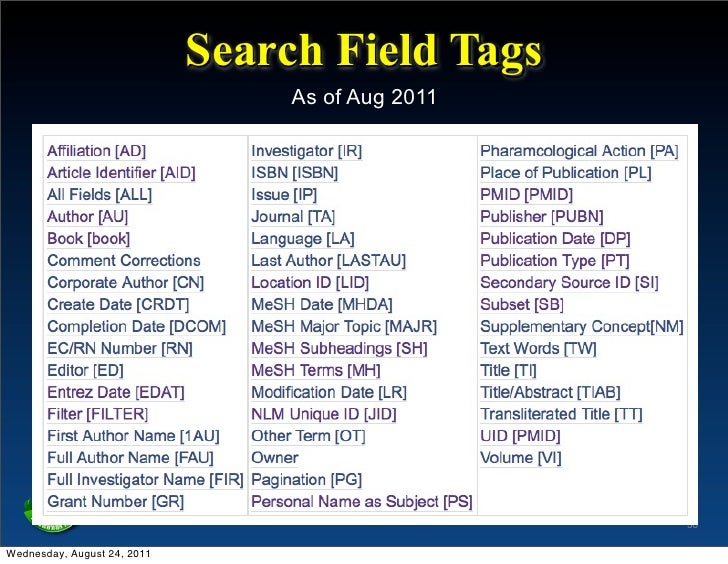
For additional info, we can use different tag to make the search easier. For example, to search article/book/journal that are written by specific author, we use [AU] tag. The other tags are:

Image result for search field tags used in ncbi

Now, this is the main part. We are being taught on how to do gene search. Here is the tutorial of searching of F2!!!

1. Go to NCBI link and choose GENE database.

2. In the search box, type F2.

3. Choose one whatever that fits to your preference.


4. There will be the entire information about F2 gene. You can choose either FASTA or GENEBANK.

Notes : FASTA will show an arranged code while GENEBANK will show the code in a long chain arrangement.


5. To save the file, go to the send to which located at upper right of the page.


6.  Choose file and create file. As easy as ABC.


To analyse the gene, we use Blast. Blast is located at the related site on the right side of the page.


The picture above shows the page of blast. We choose the protein Blast!
Choose whatever gene that you want to have the percentage of similarities. Then, click the Blast button!

There you go!

That is all what we have learnt. Hope it will help you guys in finding some gene search ! 

Till we meet again in next postπŸ˜™πŸ˜»