
Assalamulaikum wbt. and hi, we met again 😁
On 21 of February, we learnt
about PROTEIN DATA BANK and NUCLEIC ACID DATA BANK. In this chapter, we got to
know about NCBI which stands for National Centre for Biotechnology Information.
Through the link, we can search many things like PubMed for
articles, GENE, BLAST and many more.
For additional info, we can use different tag to make the
search easier. For example, to search article/book/journal that are written by
specific author, we use [AU] tag. The other tags are:
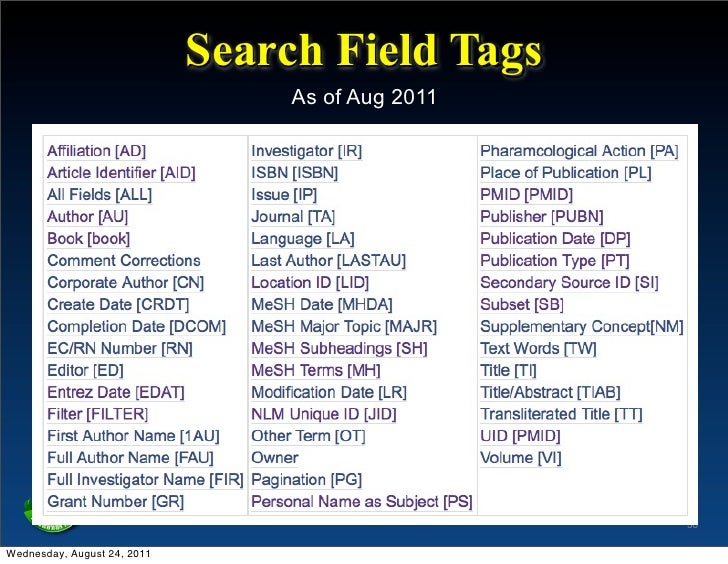
Now, this is the main part. We are being taught on how to do
gene search. Here is the tutorial of searching of F2!!!
1. Go to NCBI link and choose GENE database.
2. In the search box, type F2.

3. Choose one whatever that fits to your preference.


4. There will be the entire information about F2 gene. You
can choose either FASTA or GENEBANK.


Notes : FASTA will show an arranged code while GENEBANK will
show the code in a long chain arrangement.
5. To save the file, go to the send to which located at
upper right of the page.


6. Choose file and create file. As easy as ABC.
To analyse the gene, we use Blast. Blast is located at the related site on the right side of the page.


The picture above shows the page of blast. We choose the protein Blast!

Choose whatever gene that you want to have the percentage of similarities. Then, click the Blast button!
There you go!
That is all what we have learnt. Hope it will help you guys in finding some gene search !
Till we meet again in next post😙😻


